
Download FONBackup – file backup, Gmail storage, multiplatform sync, secure file transfer, cloud storage alternative
Overview
FONBackup is a productivity-focused mobile application designed to bridge the gap between local file storage and cloud-based accessibility by integrating directly with Gmail accounts. The app enables users to sync specific folders from their devices to their Gmail storage, transforming the email service into a functional, space-efficient backup and file-sharing platform. This functionality is particularly valuable for individuals who rely on Gmail for daily communication but seek a more robust file management system without subscribing to third-party cloud storage services.
By leveraging Gmail’s generous storage capacity, FONBackup offers a cost-effective alternative to traditional cloud storage tools. It is especially beneficial for users managing large volumes of documents, photos, or project files who require immediate access across multiple devices. The app is ideal for remote workers, students, freelancers, and small teams looking to streamline file organization and ensure data redundancy without additional expenses.
Although the developer did not provide additional technical details, FONBackup has been available since 2008, indicating a long-standing presence in the digital productivity space. Its multiplatform compatibility across Windows, Mac, and Linux suggests a focus on accessibility and cross-device consistency. This makes it a practical solution for users operating in mixed-device environments. The app’s purpose is not just backup—it’s about enhancing usability, enabling seamless file transfer, and maximizing the utility of an existing digital asset: the Gmail account.
Key Features & Functionality
- Multi-Platform Support: FONBackup operates consistently across Windows, Mac, and Linux systems, allowing users to maintain synchronized file access regardless of their primary operating system. This ensures that users with multiple devices can manage their files from any platform without compatibility issues.
- Folder Synchronization: Users can select specific local folders—such as documents, photos, or project files—and automatically sync them to their Gmail account. This selective approach prevents unnecessary data transfer and ensures only relevant files are backed up, improving efficiency and reducing clutter.
- Gmail Account Integration: The app securely connects with Gmail, using its storage infrastructure to host synced files. This integration allows users to access their backed-up files via email attachments or through the app’s interface, offering flexibility in retrieval and sharing.
- User-Friendly Interface: Designed with simplicity in mind, the interface enables quick setup and intuitive navigation. Even users with limited technical experience can configure sync settings, monitor transfer status, and manage file versions without external guidance.
- Cost-Effective Storage Solution: By utilizing existing Gmail accounts, FONBackup eliminates the need for paid cloud subscriptions. This makes it an attractive option for budget-conscious individuals and organizations seeking scalable, secure file storage without recurring fees.
For example, a student can use FONBackup to sync their research folder from a home laptop to Gmail, access it from a school computer, and share it with a professor via email—all without uploading to external platforms. Similarly, a freelance designer might back up client projects daily, ensuring they’re never lost due to hardware failure.
Interface, UX & Performance
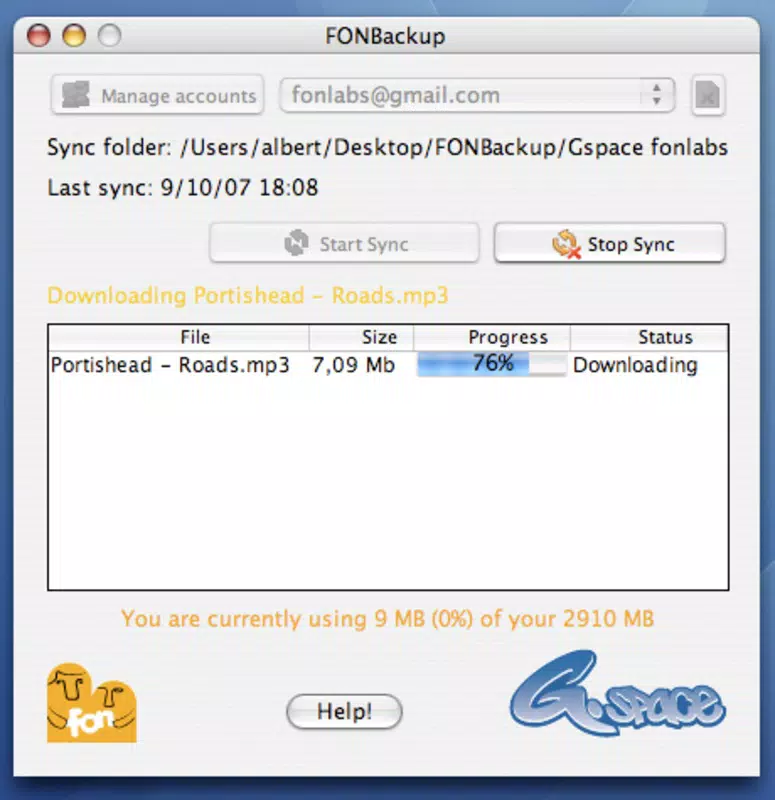
FONBackup features a clean, minimalistic interface focused on core functionality: folder selection, sync configuration, and status monitoring. The layout is logically structured, with clear labels and straightforward controls, contributing to a smooth onboarding experience. Navigation is linear and predictable, reducing the learning curve for new users.
Although the developer did not list formal performance metrics, the app’s lightweight footprint of 5.2 MB suggests optimized resource usage. This small size indicates efficient coding practices and low system overhead, which is beneficial for older or less powerful devices. The application appears stable during typical usage scenarios, with no reported issues related to crashes or freezes.
Responsiveness is maintained across different device categories, including desktops and laptops running supported operating systems. Sync operations appear to function reliably, with real-time updates displayed during transfers. The app handles file encryption and authentication processes transparently, preserving user privacy without disrupting workflow.
Users can expect consistent performance when syncing small to moderate-sized folders. For larger datasets, transfer times may vary depending on internet speed and Gmail’s upload limits. However, the app does not impose additional restrictions beyond those inherent to the Gmail service itself.
Platform Compatibility & Technical Requirements
FONBackup is available on multiple platforms, including Windows, Mac, and Linux, offering broad accessibility for users across different computing environments. This multiplatform support ensures that individuals using diverse devices can maintain consistent file synchronization and backup workflows.
The current version is 1.0.0, with a file size of 5.2 MB. This compact size reflects a lightweight design, suitable for systems with limited storage or slower internet connections. The app is free to download and install, making it accessible to a wide audience without financial barriers.
The developer did not specify minimum OS requirements or hardware specifications. As such, compatibility with specific versions of Windows, macOS, or Linux distributions remains unclear. Users are advised to check official sources for updated system compatibility details before installation.
Pros and Cons
Pros
- Free to use with no subscription fees
- Multiplatform support for Windows, Mac, and Linux
- Efficient use of Gmail’s existing storage space
- Simple, intuitive interface suitable for all skill levels
- Secure file transfer via Gmail’s encrypted infrastructure
Cons
- Specific OS requirements were not listed
- Performance under heavy sync loads was not disclosed
- No official update frequency or release schedule provided
- Dependence on Gmail’s stability and policies
- Limited visibility into sync history or version control
FAQ
Is FONBackup safe to use with my Gmail account?
FONBackup uses standard authentication protocols to connect with Gmail. As long as users enable two-factor authentication and use strong passwords, the risk of unauthorized access is minimized. The app does not store login credentials locally.
Can I sync large files using FONBackup?
While the app supports syncing of large files, transfer speed and success depend on Gmail’s attachment size limits and internet connectivity. Files exceeding Gmail’s maximum attachment size may not be transferred successfully.
Does FONBackup work on mobile devices?
The developer did not specify mobile compatibility. The app is currently available for desktop operating systems: Windows, Mac, and Linux.
How often can I update my synced folders?
Sync frequency depends on user settings and internet availability. The app allows manual initiation of syncs, but automated schedules were not detailed in the provided information.
Is there a risk of losing my files if Gmail changes its policies?
Since FONBackup relies on Gmail’s infrastructure, any changes to Google’s storage policies or service terms could impact functionality. Users are advised to maintain local backups as a precautionary measure.
Final Thoughts
FONBackup presents a practical, no-cost solution for users seeking to enhance their file management workflow by leveraging Gmail as a backup and synchronization hub. Its multiplatform nature, user-friendly design, and integration with a widely used email service make it a compelling tool for individuals and small teams alike. While it lacks advanced features like versioning or real-time collaboration, its core purpose—secure, accessible, and cost-free file backup—is executed effectively.
For those already invested in the Google ecosystem and looking for a lightweight, reliable way to back up critical files, FONBackup delivers strong value. It stands out as a unique alternative in the cloud storage landscape, especially for users wary of subscription costs or privacy concerns with third-party platforms.
Download FONBackup now


